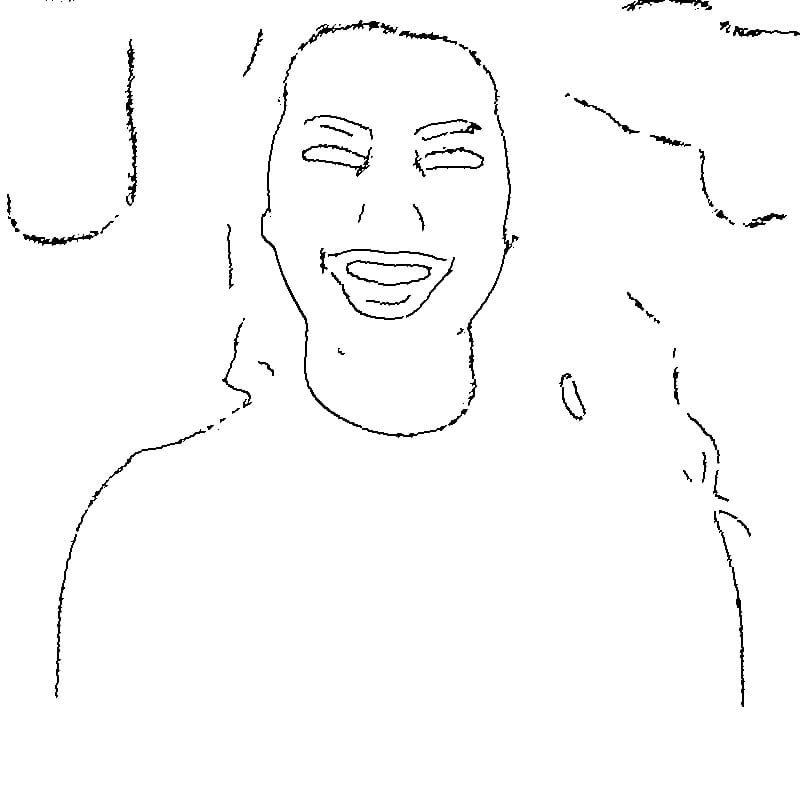
How Photo-to-Stencil Conversion Works
The conversion process uses adaptive thresholding, a computer vision technique that analyzes local brightness across the image to determine which areas should be black (ink) and which should be white (skin). Unlike a simple brightness cutoff, adaptive thresholding adjusts to varying lighting conditions within the photograph, preserving details in both shadows and highlights. The result is a clean, noise-free stencil with crisp contour lines.
Mirror Flip for Thermal Transfer
When using thermal transfer paper, the design needs to be horizontally flipped so it reads correctly once pressed onto skin. The Mirror Flip function handles this automatically. This is essential for designs containing text, asymmetric portraits, or any image where orientation matters.
Controlling Line Detail with Intensity
The Intensity slider adjusts how much visual information is captured from the source photo. For bold traditional tattoo designs with thick outlines and simple shapes, a lower intensity setting works best — it captures only the strongest edges and ignores fine details. For realistic portrait tattoos where subtle shading and detailed features matter, increase the intensity to preserve more of the photograph's tonal information.
Adjusting Line Weight
The Line Weight control thickens or thins the stencil lines. Thicker lines provide more margin for error during tattooing and work well for traditional or neo-traditional styles. Thinner lines suit fine-line tattoo work and detailed realistic pieces. Match the line weight to your preferred needle configuration and tattooing technique.
Choosing the Right Source Photo
The best source photos for tattoo stencils have strong contrast between the subject and background, clear edges, and minimal noise. Portraits should have good directional lighting that defines facial features. Animal photos work best when the subject is sharply focused against a simple background. Avoid heavily compressed images or photos taken in low light, as these introduce noise that degrades stencil quality.
Output and Printing
The generated stencil exports as a high-resolution PNG with pure white background. For thermal transfer printing, use standard stencil paper and ensure your printer is set to the highest quality setting. The clean white background ensures no unwanted marks transfer onto skin. All processing runs locally in your browser — client photos and proprietary designs remain completely private.
Thermal transfer paper types explained
Most artists use spirit master / thermal stencil paper, a four-ply sheet (top printing layer, milky protective tissue, carbon transfer layer, and a yellow backing). Print or trace onto the top layer with the milky tissue removed, and the purple carbon ply imprints your design. A4 and US Letter sheets cost roughly $0.30 to $0.60 each. There are two ways to get your converted image onto it: a dedicated thermal stencil printer (Brother, HP, or a purpose-built unit like the Stencil Stuff or Inkbox-style machines), or hand-tracing. Our high-contrast PNG export is ready for either path because the lines are already black-on-white.
How to use a thermal stencil printer
A thermal printer fuses the design without ink, so it works only with thermal stencil paper, not standard inkjet sheets. Load the four-ply sheet so the printing layer faces the heat element (check your printer's diagram, as orientation is easy to reverse). Print your converted stencil at 100% scale, then peel away the milky tissue and yellow backing to reveal a crisp purple line drawing. Set your tool's line weight to medium before exporting; ultra-thin lines can break up under the heat element, while overly thick lines bleed into solid blobs once applied.
Hand-tracing as a no-printer alternative
If you do not own a thermal machine, you can still transfer a downloaded stencil by hand. Print the image on plain paper, lay a sheet of thermal/hectograph paper underneath (carbon side up against the back of your printout), tape the stack down, and trace every line firmly with a ballpoint pen or stylus. The pressure imprints the carbon onto the top layer exactly where you trace. Because our converter outputs clean, closed outlines rather than fuzzy gradients, you get an unambiguous path to follow, which keeps hand-traced stencils sharp and avoids guesswork on faint areas.
Applying the stencil to skin step by step
Shave and clean the area, then wipe it with 70% isopropyl alcohol and let it dry. Apply a thin, even layer of stencil transfer solution (common brands include Stencil Stuff, Electrum, or a roll-on speed/deodorant stick in a pinch), and wait until it becomes tacky, usually 30 to 60 seconds. Press the stencil down without sliding it, hold firm pressure for 20 to 30 seconds, and peel slowly from one corner. Let the transferred design dry fully for several minutes before tattooing so it sets into the skin.
Why mirror flip matters with real examples
A stencil transfers as a mirror image of whatever sits on the paper, so anything with direction or text must be flipped before printing. The clearest example is lettering: the word LOVE traced normally onto stencil paper will appear backward (EVOL) on the skin. The same applies to a clock face, a portrait facing left that the client wants facing right, or a compass rose. Our one-click mirror toggle flips the converted artwork so the transferred result reads correctly. Always preview the mirrored version against the limb placement before you commit it to thermal paper.
Lettering and script tattoo considerations
Text and fine script are unforgiving because the eye instantly catches uneven letterforms. When converting a typed or handwritten phrase, raise the threshold/intensity slightly so thin strokes stay connected and serifs do not drop out, and keep line weight thin to medium so adjacent letters do not merge. Cursive and calligraphy benefit from a clean, high-resolution source image (at least 1500 px wide) because the converter preserves the connecting hairlines. Remember to enable mirror flip for all text, and proof every character on the previewed stencil, since a single broken loop in a word is obvious once it is on the skin.
Fine-line versus bold traditional settings
Fine-line and single-needle work needs delicate, continuous outlines, so use a thin line weight and a moderate threshold to retain subtle detail like loose botanical stems or thin lettering. Bold traditional, neo-traditional, and blackwork rely on heavy, confident outlines, so increase line weight and push the threshold higher to drop noisy mid-tones and leave only the strong shapes. For black-and-grey realism, treat the stencil as a guide for major boundaries and shadow edges rather than every gradient; convert at a higher contrast so the artist fills the shading freehand inside clean reference lines.
Client privacy and studio workflow benefits
Because every conversion runs locally in your browser, client reference photos and custom designs never leave your device or get uploaded to a server, which matters when you are handling someone's face, name, or personal imagery. There is no account, no cloud storage, and no watermark on the output. For a busy studio this means you can prep a clean stencil during the consultation in under a minute, iterate on threshold and line weight live with the client watching, and export a print-ready file straight to your thermal printer without round-tripping through desktop editing software.
A note on reference photos and copyright
Just because you can convert an image into a stencil does not always mean you have the right to tattoo it. Photographs, illustrations, logos, and another artist's flash are protected by copyright, and reproducing them without permission, especially commercially, can create legal exposure. Use your own photos, properly licensed images, public-domain works, or original designs you have permission to use, and when a client brings a copyrighted reference, treat it as inspiration to redraw rather than a 1:1 copy. This tool converts whatever you provide; the responsibility for usage rights stays with you and your client.
How do I make a tattoo stencil from a photo?
Upload your photo to this free browser-based tool, and it automatically converts the image into clean black outlines using adaptive thresholding. Adjust the intensity and line weight until the design reads clearly, enable mirror flip if it contains text or directional elements, then download the high-contrast PNG. Finally, transfer that file to thermal stencil paper using a thermal printer or by hand-tracing, and apply it to prepped skin with stencil solution.
Do I need a thermal printer to make a tattoo stencil?
No, a thermal printer is the fastest option but not required. You can hand-trace the downloaded design onto thermal/hectograph paper by placing the carbon sheet under a plain printout and tracing every line with a pen. The converter produces clean, closed outlines specifically so hand-tracing stays accurate. A dedicated thermal stencil printer simply saves time when you make many stencils.
Can I print a tattoo stencil at home?
Yes. You can generate and download the stencil for free at home in seconds, then either run thermal stencil paper through a home thermal stencil printer or hand-trace the design onto carbon paper. What you cannot do is print directly onto stencil paper with an ordinary inkjet or laser printer and expect it to transfer; the purple carbon layer is what imprints the skin, so the design must end up on that thermal sheet.
What photos make good tattoo stencils?
The best sources have strong contrast, clear edges, and good lighting, such as a sharply lit portrait, a bold silhouette, or a high-resolution line illustration. Avoid blurry, low-light, or busy images where the subject blends into the background, because soft gradients give the converter little to outline. Aim for at least 1500 pixels on the long side, simplify the composition before uploading if possible, and choose subjects whose key shapes are easy to read at the final tattoo size.