Understanding the Three-Level Threshold System
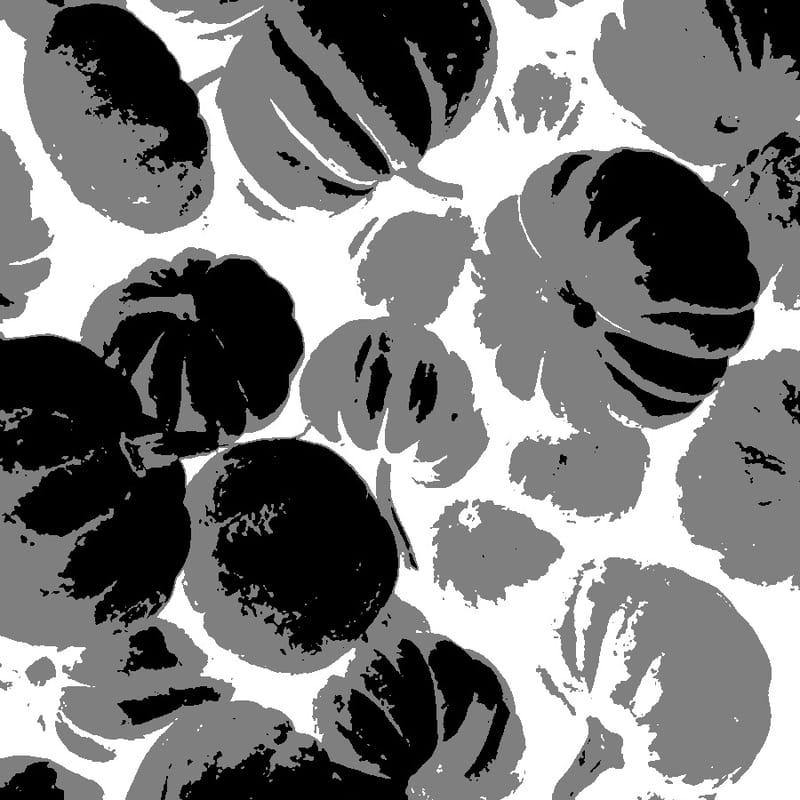
This tool converts photographs into pumpkin carving stencils using a three-level threshold algorithm, which is fundamentally different from the two-level (black and white) conversion used by most image-to-stencil tools. The algorithm analyzes the brightness of every pixel in the source image and assigns it to one of three categories. Pixels darker than the lower threshold become black, representing areas that should be cut completely through the pumpkin wall. Pixels between the lower and upper thresholds become gray, representing areas where the pumpkin surface should be scraped thin but not punctured. Pixels brighter than the upper threshold become white, representing areas of untouched pumpkin rind. This three-level approach is essential because pumpkin carving is one of the few art forms where three distinct physical states — fully removed, partially removed, and intact — are all readily achievable and visually distinct when illuminated from behind. The cut-through areas glow brightest, the scraped areas produce a warm amber translucence, and the intact surface remains dark, creating a rich interplay of light and shadow that two-level stencils cannot match.
Cut-Through, Scraping, and Intact Surface Techniques
Each of the three tonal levels in the stencil corresponds to a distinct carving technique. The black (cut-through) areas require removing the pumpkin wall entirely, creating openings through which candlelight or LED light passes directly. Use a serrated carving saw or a sharp craft knife to cut along the boundary lines, then push the cut pieces inward or outward and remove them. The gray (scraped) areas require a more delicate touch. Using a ribbon loop tool, gouge, or clay sculpting tool, carefully scrape away the outer rind and most of the flesh, leaving a thin membrane approximately one-quarter inch thick. When illuminated from inside, this thin wall glows with a warm orange translucence. The thickness of the remaining wall determines the brightness of the glow — thinner scraping produces brighter light, while leaving more flesh creates a dimmer, more subtle effect. Scraped areas give you continuous tonal control that cut-through areas cannot provide. The white (intact) areas require no carving at all — simply leave the pumpkin surface untouched. These areas remain dark when the pumpkin is lit, providing the shadows and contrast that define the image.
Choosing and Preparing Your Pumpkin for a Stencil Design
The size of your pumpkin should match the complexity of your stencil. Simple designs with large tonal areas work on pumpkins of any size, but detailed portrait stencils require a larger canvas. For a portrait with recognizable facial features, a pumpkin at least twelve inches in diameter is recommended. Before applying the stencil, prepare the carving surface by cutting off the top (or bottom — some carvers prefer a bottom opening for easier lighting) and thoroughly scooping out all seeds and stringy pulp. Use a large spoon or ice cream scoop to scrape the interior wall of the carving area until it is uniformly about one inch thick. This thinning step is critical: a thick wall makes scraping the gray areas much more difficult and produces less dramatic backlighting effects.
Transferring Stencils to the Pumpkin Surface
Several methods work for transferring your printed stencil design onto the pumpkin. The most common approach is the pin-prick method: tape the printed stencil firmly to the pumpkin surface using masking tape, then use a pushpin, thumbtack, or dedicated pattern transfer tool to poke holes through the paper and into the pumpkin rind along every boundary line between the three tonal zones. Space the pin pricks about one-eighth inch apart — close enough that you can connect the dots when carving. Remove the paper, and you will see a dotted outline of your design impressed into the pumpkin surface. An alternative method uses graphite transfer paper (sometimes called carbon paper). Place a sheet of graphite paper face-down on the pumpkin, position your stencil on top, and trace all the boundary lines with a ballpoint pen, pressing firmly. The graphite transfers to the pumpkin surface, leaving visible gray lines to guide your carving. A third method, favored by experienced carvers, is to tape the stencil directly to the pumpkin and carve through the paper itself, using the printed pattern as a direct cutting guide.
Carving Tools and Techniques
While the basic serrated pumpkin saws included in grocery store carving kits work for simple cut-through designs, detailed stencil work benefits from better tools. A set of small serrated blades in different widths allows you to cut intricate shapes and tight curves. Ribbon loop tools (also called lemon zesters or clay loop tools) are essential for scraping the gray areas — they remove thin, controlled layers of pumpkin flesh with each pass. Small gouges and V-tools, similar to those used in wood carving or linoleum block printing, provide precise control for detailed scraping work. Some advanced carvers use rotary tools (such as a Dremel) with small ball-shaped or cylindrical burrs to remove material quickly and evenly in scraped areas. For straight cuts, a sharp X-Acto knife or craft knife with a fresh blade provides more control than a serrated saw. Whatever tools you use, keep them sharp — dull tools crush pumpkin flesh rather than cutting it cleanly, leading to ragged edges and premature decay.
Safety Considerations
Pumpkin carving involves sharp tools and a work surface that can be slippery with moisture and pulp. Work on a stable, flat surface and keep your non-cutting hand behind the blade at all times. Cut away from your body, not toward it. Children should use only safety carving tools designed for young hands — the dull plastic saws sold in children's carving kits are genuinely safer, not just a gimmick. If using a Dremel or other rotary tool, wear safety glasses to protect against flying pumpkin debris. Take breaks during long carving sessions, as hand fatigue increases the risk of slips.
Preserving Your Carved Pumpkin
A carved pumpkin begins to deteriorate within hours of carving as exposure to air causes oxidation and bacterial growth. Several preservation techniques can extend the life of your creation to a week or more. Immediately after carving, apply a thin coat of petroleum jelly (Vaseline) to all cut and scraped surfaces — this seals the exposed flesh and slows moisture loss. Alternatively, spray the interior and all cut edges with a solution of one tablespoon of bleach per quart of water, which inhibits mold and bacterial growth. Some carvers soak the entire finished pumpkin in a bleach-water bath for several hours before display. Store the pumpkin in a cool location (a garage, basement, or refrigerator) when not on display. Avoid leaving carved pumpkins in direct sunlight, which accelerates decomposition. If the pumpkin begins to shrivel, soak it in cold water for several hours to rehydrate the flesh.
Lighting Your Jack-o-Lantern
Traditional candle lighting creates a warm, flickering glow that many people prefer for its atmospheric quality, but candles pose a fire risk and generate heat that accelerates pumpkin decomposition. Battery-operated LED tea lights and puck lights provide a safe, cool alternative that preserves your carving longer. LED lights are available in warm white (which closely mimics candlelight) and various colors for creative effects. For the most dramatic illumination of a three-level carved pumpkin, place the light source low and toward the back of the pumpkin interior so that light passes through both the cut-through and scraped areas at a strong angle. Multiple small LED lights distributed across the pumpkin floor provide more even illumination than a single central light.
Photographing Carved Pumpkins
To capture your carved pumpkin at its best, photograph it in near-darkness with the internal light as the primary illumination. Turn off room lights and wait for dusk or full darkness outdoors. Use a tripod or set your camera on a stable surface, as the low light will require a slow shutter speed. A smartphone in night mode often produces surprisingly good results. The three-level carving technique is particularly photogenic because the scraped areas create beautiful gradients of warm amber light that single-level carvings lack. Experiment with camera angles — shooting slightly below eye level often produces the most dramatic perspective.
Themed Carving Ideas
The three-level stencil technique opens up a wide range of subject matter beyond traditional jack-o-lantern faces. Pet portraits make charming and personal pumpkin carvings — upload a photo of your dog, cat, or other companion animal and let the algorithm create a three-level stencil. Movie characters and pop culture icons work well, particularly those with strong, recognizable silhouettes. Text and lettering, including house numbers and welcome messages, benefit from the three-level approach because scraped backgrounds provide contrast that makes letters readable from a distance. Spooky scenes — haunted houses, bare trees, bats, and witches — are natural subjects for Halloween pumpkin carving.
The Intensity Slider and Tonal Balance
The intensity slider in this tool controls where the two threshold boundaries fall between black, gray, and white. Moving the slider toward lower values shifts both thresholds downward, creating more cut-through (black) and scraped (gray) areas relative to intact (white) surface. This produces a brighter, more dramatically lit pumpkin with less dark surface area. Moving the slider toward higher values shifts the thresholds upward, preserving more intact surface and reducing the carved areas. This produces a subtler, more detailed result where fine features are preserved in the delicate balance between scraped and intact zones. For a first attempt with a new photo, start with a middle intensity setting, evaluate the preview, and adjust in either direction until the three tonal zones create a balanced, recognizable image.
Alternatives to Traditional Carving
For those who prefer not to carve, or who want a pumpkin display that lasts the entire autumn season, the stencil generated by this tool can also serve as a template for painted pumpkins. Tape the stencil to an uncarved pumpkin, transfer the outline using the pin-prick or graphite method, then paint the three zones in different colors or shades using acrylic craft paint. Black, gray, and white paint on an orange pumpkin surface produces a striking graphic effect. Painted pumpkins last for months rather than days, making them practical for early-October decorating. Another no-carve option is to use the stencil as a template for applying adhesive vinyl or contact paper, creating a clean graphic design on the pumpkin surface.
All processing happens entirely in your browser — completely free, private, and instant. No sign-up required.