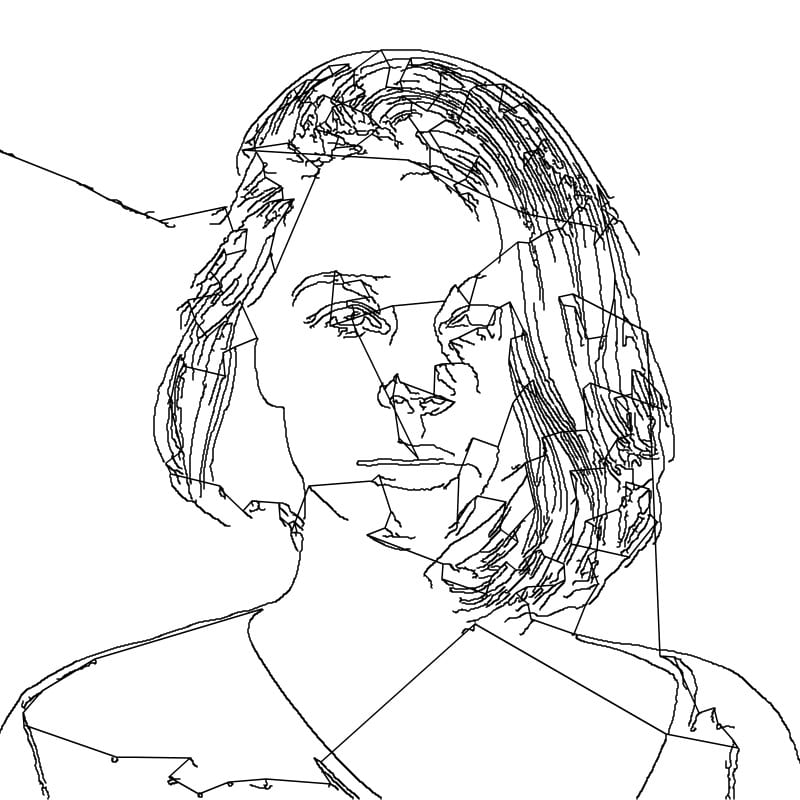
The Technical Pipeline — From Photograph to Continuous Path
Converting a photograph into a continuous line drawing involves a sophisticated multi-stage process. The first stage is edge detection using the Canny algorithm. The photograph is converted to grayscale and smoothed with a Gaussian blur to suppress noise. Gradient magnitudes and directions are then computed across the image, identifying locations where brightness changes sharply. Non-maximum suppression thins these gradient responses to single-pixel-wide edges, and hysteresis thresholding with two threshold values determines which edges are significant enough to keep. The result is a binary edge map — a clean set of contour lines representing the significant boundaries in the image. The second stage is contour tracing. The edge map is scanned to identify connected groups of edge pixels, each representing a distinct contour segment. These contour segments are extracted as ordered sequences of coordinates. The third stage is the nearest-neighbor path connection algorithm. Starting from one contour, the algorithm finds the closest endpoint of any unvisited contour and draws a connecting line to reach it, then traces that contour to its far end, and repeats. This greedy approach produces a single continuous path that visits every detected contour while minimizing the total length of connecting lines between them. The result is exported as an SVG path element — a single continuous vector path that can be rendered at any scale.
How the Algorithm Decides Which Contours to Include and Connect: The Intensity slider directly controls the Canny edge detection thresholds, which in turn determine how many contour segments are extracted from the image. At low intensity settings, only the strongest, most prominent edges survive thresholding — producing a sparse set of contours that capture major features like the outline of a face, the bridge of a nose, or the curve of a shoulder. At higher settings, subtler edges are included — individual strands of hair, texture on clothing, wrinkles, and fine details. The nearest-neighbor connection algorithm then determines the order in which these contours are visited. Because it always jumps to the closest available contour endpoint, the connecting lines tend to be short and relatively unobtrusive. However, when contours are spread far apart in the image, the connecting lines become longer and more visible, creating the characteristic "jumping" lines that are part of the one-line aesthetic. These connecting passages are not flaws — they are an inherent part of the continuous line style, and many artists deliberately use them as compositional elements.
SVG Vector Format and Why It Matters for One-Line Art
The output of this tool is an SVG file — Scalable Vector Graphics, the web standard for vector imagery. Unlike raster formats like PNG or JPEG, which store images as grids of colored pixels, SVG stores images as mathematical descriptions of shapes and paths. For one-line art, the entire drawing is literally a single path element defined by a sequence of coordinate points. This has several important practical implications. First, infinite scalability: you can enlarge an SVG to billboard size without any loss of quality, because the rendering engine recalculates the curves at whatever resolution is needed. Second, pen plotter compatibility: pen plotters — robotic drawing machines that move a real pen across real paper — read SVG path data directly. The single continuous path in a one-line drawing is the ideal input format for a pen plotter, since the machine can draw the entire image without lifting the pen, producing an authentic hand-drawn artifact. Third, laser cutter and CNC compatibility: laser cutters and CNC routers also accept SVG path data, allowing the one-line drawing to be cut or engraved into wood, acrylic, metal, leather, and other materials.
The Intensity Slider and Complexity Control
The Intensity slider is the primary creative control for shaping the character of your one-line drawing. At its lowest settings, the drawing captures only the boldest contours — a handful of lines that suggest the subject in the most abstract terms. These minimal drawings have the aesthetic of a quick gesture sketch, capturing movement and essence rather than likeness. As intensity increases, more contours are included, and the drawing becomes progressively more detailed and recognizable. At moderate settings, you get a balanced result that most people find the most visually appealing — enough detail for clear recognition, but enough abstraction to maintain the artistic quality. At maximum intensity, every detectable edge is included, producing dense, intricate drawings that can feel almost overwhelming. Finding the right intensity for a given image is a matter of experimentation and personal taste.
Creative Applications of One-Line Art
The versatility of continuous line drawings extends across a wide range of creative applications. As wall art, large-format one-line prints make striking, conversation-starting decor — particularly one-line portraits or figure studies. The minimalist aesthetic suits modern interiors especially well, complementing clean lines and neutral color palettes without competing for visual attention. For tattoo concepts, one-line drawings translate beautifully to skin — the continuous path format naturally produces designs that work well with the linear nature of tattooing. Many tattoo artists and their clients use one-line generators as starting points for custom designs, refining the output into final tattoo artwork. Wedding decorations represent another popular application: one-line portraits of the couple can appear on invitations, programs, welcome signs, and guest books, adding a personal artistic touch. In logo design, one-line illustrations communicate creativity, sophistication, and handcrafted quality — values that many brands want to project. Custom merchandise — t-shirts, tote bags, mugs, phone cases — also benefits from the clean, high-contrast nature of one-line art, which reproduces well across printing methods from screen printing to direct-to-garment.
Pen Plotter Technology and One-Line Art
Pen plotters have experienced a remarkable renaissance in the art world over the past decade. The AxiDraw, manufactured by Evil Mad Scientist, is perhaps the most well-known consumer pen plotter. It holds a real pen, marker, or brush, and moves it across paper following SVG path instructions from a computer. The result is a genuine physical drawing, complete with the subtle imperfections and ink variations that make hand-drawn work feel authentic. For one-line art, pen plotters are the ideal output device because the continuous path format means the plotter never needs to lift the pen — it draws the entire image in one unbroken stroke, just as a human artist would. Other popular plotters include the HP 7475A (a vintage favorite among plotter art enthusiasts), the iDraw series, and various DIY builds based on Arduino and stepper motors. The pen plotter community has grown substantially, with dedicated forums, social media groups, and exhibitions showcasing algorithmically generated artwork drawn by machines on paper.
CNC and Laser Cutting Applications
Beyond pen plotting, the SVG output from this tool can be used with laser cutters to engrave or cut one-line portraits and artwork into physical materials. Engraving a continuous line drawing into a piece of walnut or maple produces a beautiful, tactile art object — the laser follows the exact path, burning a thin line into the wood surface. Cutting the path from thin material like paper, cardstock, or veneer creates a delicate, lace-like cutout that can be mounted on a contrasting background. CNC routers can carve the path into thicker materials at larger scales, producing signs, wall panels, and sculptural pieces. The single continuous path is particularly well-suited to these fabrication methods because it avoids the problems that arise with multiple disconnected paths — no alignment issues, no lost small pieces, no ambiguity about which lines to cut and which to skip.
Choosing Photos for the Best One-Line Results
Not all photographs convert equally well into compelling one-line drawings. The best source images have clear, well-defined subjects with strong contours and simple or uncluttered backgrounds. Portraits work exceptionally well — the human face contains a set of universally recognizable features (eyes, nose, mouth, jawline) that translate naturally into a few essential contour lines. Profile views and three-quarter views often produce more interesting results than straight-on frontal shots, because the profile silhouette provides a strong outer contour that anchors the drawing. Photos with strong contrast between subject and background produce cleaner results, since the edge detection algorithm can clearly distinguish where the subject ends and the background begins. Busy backgrounds, low lighting, and heavily textured subjects tend to produce noisier results that may require higher editing effort or careful intensity adjustment.
The Aesthetic Value of Imperfection in Continuous Line Drawing: One of the most interesting aspects of one-line art is that imperfections are not flaws — they are features. The slightly awkward connecting lines between distant contours, the occasional unexpected leap from one feature to another, the places where the path doubles back on itself — these artifacts of the algorithmic process give the drawing its character. They are analogous to the wobbles and hesitations in a hand-drawn line, which art lovers and collectors prize precisely because they are evidence of a human (or in this case, algorithmic) process. Perfect lines are the domain of CAD software and architectural drafting; one-line art lives in the space between order and chaos, between intention and accident.
One-Line Portraits as Personalized Gifts
One-line portraits have become increasingly popular as personalized gifts, especially for occasions like anniversaries, birthdays, and weddings. The appeal is that a one-line portrait of someone you love feels both intimate and artistic — it captures their likeness in a way that is clearly personal, but presents it as a piece of fine art rather than a mere photograph. Printed on quality paper, framed, and presented as a gift, a one-line portrait shows a level of thought and creativity that a standard photo print does not. For couples, a one-line drawing that captures both partners in a single continuous path carries a beautiful metaphor of connection and unity. Our tattoo stencil maker can also be useful for those who want to explore converting portraits into other artistic formats.
Contemporary One-Line Artists and Their Techniques
The continuous line drawing style has attracted a thriving community of contemporary artists who have built entire practices around the medium. Artists like Differantly (the duo of DFT), Quibe, and Christophe Louis Quelin have gained large followings for their one-line portraits and figure studies, selling prints, licensing designs, and exhibiting internationally. These artists typically work by hand rather than algorithmically, developing their skills through years of practice to produce drawings of remarkable precision and beauty within the one-line constraint. Their work demonstrates the extraordinary expressive range possible within what might initially seem like a limiting format — from tender, intimate portraits to dynamic, energetic figure studies. The intersection of algorithmic and hand-drawn approaches to one-line art is a fertile creative space, with many artists using algorithmic tools as starting points that they then refine and reinterpret by hand.
The Intersection of Algorithm and Art
This tool sits at a fascinating crossroads between computer science and artistic expression. The Canny edge detection algorithm was developed for machine vision applications — helping robots and automated systems identify objects in their environment. The nearest-neighbor path connection algorithm has its roots in combinatorial optimization, closely related to the traveling salesman problem. Yet when these engineering tools are applied to artistic source material and their output is presented as a single continuous drawn line, the result is something that genuinely moves people. This is perhaps the defining characteristic of computational art: it takes processes designed for entirely practical purposes and reveals the unexpected beauty hidden within them. Whether you use this tool to create a gift for someone you love, a piece of wall art for your home, or a design for laser cutting, you are participating in this conversation between technology and art.
All processing happens in your browser — your photos remain private. Free to use with no limitations.