Why Pixel Art Endures as an Art Form
The persistence of pixel art in an era of photorealistic rendering and unlimited color palettes reveals something fundamental about how humans respond to visual art. Pixel art communicates through suggestion rather than description. A character's face rendered in 16 by 16 pixels cannot show every facial feature in detail — instead, a few carefully placed pixels suggest eyes, a mouth, an expression. The viewer's brain fills in the rest, creating a mental image that is often more vivid and personal than what a high-resolution render would produce. This participatory quality gives pixel art its emotional warmth. There is also a clarity to pixel art that more detailed styles sometimes lack. Because every pixel is intentional, there is no visual noise, no ambiguity about what belongs and what is accidental. The grid structure imposes an order and rhythm on the composition that the eye finds satisfying. And pixel art carries deep cultural associations — for millions of people, it evokes childhood memories of playing games on early consoles, creating a powerful emotional connection that no other visual style can replicate. The indie game renaissance of the 2010s cemented pixel art's status as a legitimate contemporary art form. Games like Celeste, Stardew Valley, Undertale, Hyper Light Drifter, and Shovel Knight demonstrated that pixel art could be used to create visually stunning, emotionally resonant experiences that stood alongside or surpassed their high-budget 3D counterparts.
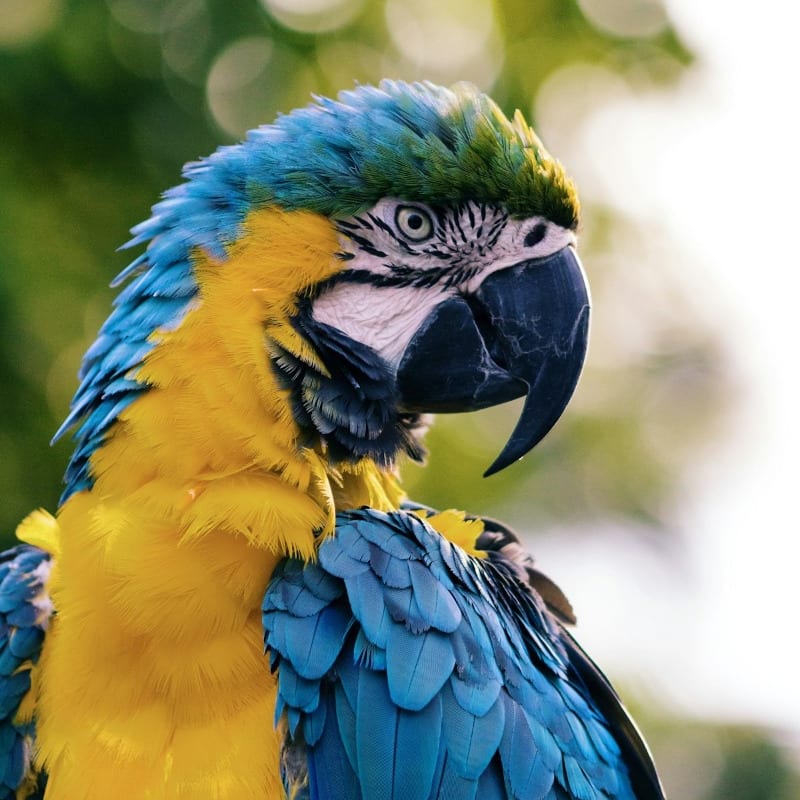
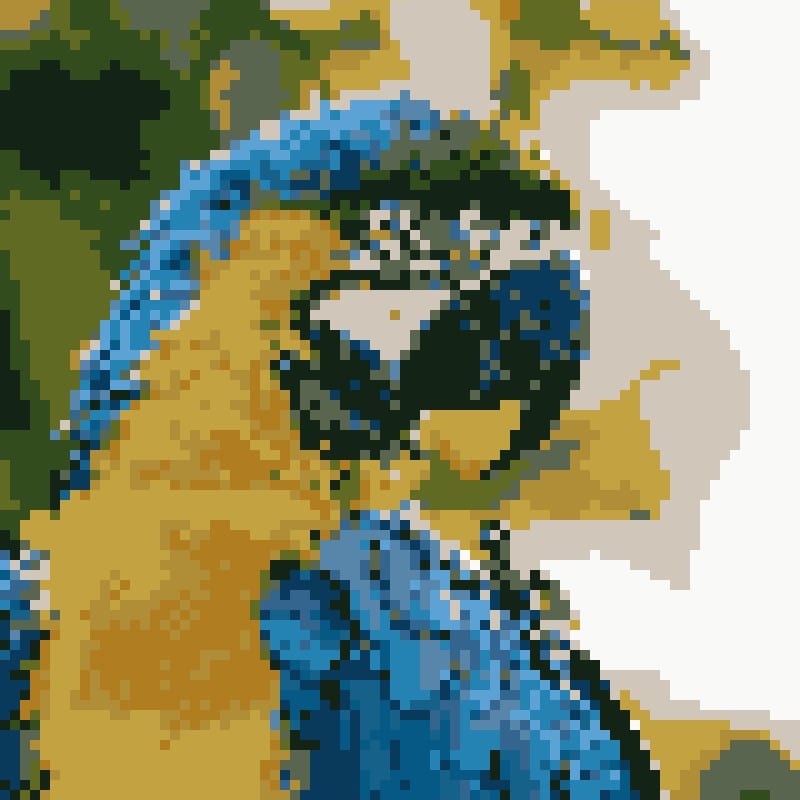
The Technical Process — How Photo-to-Pixel-Art Conversion Works: Converting a photograph into pixel art involves three core operations that mirror the constraints early game artists worked within. The first operation is downsampling — reducing the image resolution by dividing it into a grid of blocks. Each block will become a single "pixel" in the output. The size of these blocks determines the level of abstraction: larger blocks produce a coarser, more abstract result reminiscent of early 8-bit graphics, while smaller blocks retain more photographic detail in the style of 16-bit or modern pixel art. Within each block, the algorithm calculates the average color of all the source pixels it contains, producing a single representative color. The second operation is color quantization using K-Means clustering. This algorithm takes all the averaged block colors and groups them into a specified number of clusters — say, 8 or 16 colors. Each cluster center becomes one color in the final palette, and every block is assigned the nearest cluster color. This process mirrors the fixed palettes of vintage hardware: just as an NES artist had to choose the best 3 colors for each sprite from a limited master palette, the K-Means algorithm finds the optimal small set of colors to represent the entire image. The third operation is nearest-neighbor upscaling. The tiny downsampled image is scaled back up to a viewable size, but instead of using smooth interpolation (which would produce a blurry result), the algorithm uses nearest-neighbor sampling, which simply repeats each pixel as a crisp, hard-edged square block. This is what produces the characteristic sharp, blocky look that defines pixel art.
Color Palette Theory for Pixel Art
The relationship between color palette and visual style in pixel art is profound and worth understanding. The NES palette consisted of 54 unique colors (with some duplicates, technically 64 entries), heavily weighted toward primary and secondary hues with limited saturation range. This is why NES games have their distinctive bold, slightly garish color sensibility — the hardware simply could not produce subtle earth tones or muted pastels. The Game Boy's four shades of green (actually closer to olive and dark green) created a monochromatic aesthetic so distinctive that it has become an entire visual subgenre. Artists deliberately restrict their palettes to four green shades to evoke Game Boy nostalgia, even when working on hardware with no such limitation. The SNES palette of 256 simultaneous colors from 32,768 possible enabled a quantum leap in visual sophistication — gradients, shadows, atmospheric lighting, and subtle color transitions became possible for the first time on a home console. When using this converter tool, the Colors slider lets you specify the palette size, and each choice produces a different visual character. Two to four colors creates stark, graphic results reminiscent of the earliest computers. Eight colors approaches the NES aesthetic. Sixteen colors produces the richer look of 16-bit era games. Thirty-two colors allows for smooth gradients and photographic detail while still maintaining the pixelated character.
Grid Resolution and Artistic Style
The relationship between pixel block size and artistic style maps roughly to gaming eras. Very large pixel blocks (high Intensity values in this tool) produce images that feel like early arcade games or Atari 2600 graphics — extremely abstract, with subjects barely recognizable. This level of abstraction works well for simple, iconic subjects: a face, a flower, a car. Medium pixel blocks correspond to the NES and Master System era — enough resolution to represent complex scenes with recognizable characters and objects, but still clearly stylized and simplified. Smaller pixel blocks approach the SNES and Genesis era, where pixel art could be genuinely detailed and atmospheric while still maintaining its characteristic grid structure. The smallest block sizes produce what might be called modern pixel art — the style used in contemporary indie games where the pixel grid is visible but the detail level approaches that of hand-drawn illustration.
Dithering Techniques in Pixel Art
When a pixel artist needs to suggest a color that does not exist in their limited palette, they use dithering — arranging two different colored pixels in a pattern that the eye blends into an intermediate tone. Ordered dithering places pixels in regular, predictable patterns (like a checkerboard), creating a mechanical, textile-like texture. Floyd-Steinberg dithering distributes quantization error across neighboring pixels, producing a more organic, photographic result. Artistic dithering — the kind practiced by skilled pixel artists — uses irregular, hand-placed patterns that follow the contours of the subject, creating texture and form simultaneously. While this automated conversion tool does not apply traditional dithering (it assigns a single color per block), understanding dithering helps explain why the limited palette can still produce surprisingly nuanced results: the arrangement of differently colored blocks across the image creates visual blending at normal viewing distances.
Anti-Aliasing vs Hard Pixels
In conventional computer graphics, anti-aliasing is used to smooth the jagged edges (often called "jaggies") that appear when diagonal and curved lines are rendered on a pixel grid. Semi-transparent pixels are placed along edges to create a visual blend between the foreground and background. In pixel art, however, anti-aliasing is a complex and debated topic. Purists insist on hard, crisp pixel boundaries with no blending — every pixel is fully one color or another. This approach produces the sharpest, most authentic retro aesthetic. Other pixel artists use selective anti-aliasing, manually placing intermediate-colored pixels along key edges to smooth curves while maintaining the overall pixel grid. This tool produces hard-pixel output with no anti-aliasing, which is the correct default for pixel art — any smoothing or interpolation would compromise the aesthetic integrity of the result. The output canvas explicitly uses nearest-neighbor rendering to maintain pixel-perfect sharpness at all zoom levels.
The Pixel Art Community and Culture
Pixel art has fostered one of the most active and supportive creative communities on the internet. The Pixel Dailies community on social media posts daily themes, challenging artists to create pixel art on a given subject each day — a practice that has produced millions of individual artworks and helped countless artists develop their skills. Dedicated pixel art forums and communities provide feedback, tutorials, and collaboration opportunities. Sprite sheets — organized grids of character animation frames — are shared, studied, and discussed with the same seriousness that traditional art students bring to figure drawing. Game jams regularly feature pixel art categories, and pixel art exhibitions have appeared in galleries and museums worldwide. The community spans hobbyists creating art for fun, professional game artists working on commercial titles, and fine artists using the pixel grid as a medium for contemporary art practice.
Game Development Applications
For indie game developers, this photo-to-pixel-art converter can serve as a rapid prototyping tool. Converting reference photographs into pixel art provides a starting point for sprite creation, environment design, and tile map construction. While the output will typically need refinement by a skilled pixel artist before it is game-ready, it provides a useful foundation that captures the proportions, colors, and composition of the reference image in pixel form. Sprite sheets for character animation, background tiles for level design, and UI elements like icons and buttons can all begin as photo conversions that are then cleaned up and adjusted to meet the specific requirements of the game's visual style.
Choosing Photos That Work for Pixel Art Conversion
The best source photos for pixel art conversion have clear subjects with strong silhouettes and relatively simple compositions. Close-up portraits, single objects against plain backgrounds, and bold architectural subjects all convert well. Photos with busy backgrounds, fine textures, or subtle tonal gradations tend to lose their defining characteristics when reduced to a small grid with limited colors. High contrast between subject and background helps the algorithm preserve the subject's outline even at very low resolutions. Well-lit photos with strong directional lighting produce better results than flat, evenly lit images, because the lighting creates value structure that survives the quantization process.
The Colors Slider and Palette Control
The Colors slider is your primary tool for controlling the visual richness of the pixel art output. At the minimum setting of 2 colors, the result is essentially a 1-bit image — pure black and white (or whatever two colors best represent the image). This extreme reduction can produce striking, graphic results from the right source material. At 4 colors, the output resembles Game Boy-era graphics. At 8 colors, you approach NES-style visuals. At 16, the result has the warmth and depth of SNES-era pixel art. At the maximum of 32 colors, the pixel art retains much of the photographic detail while still maintaining its characteristic blocky, pixelated quality. Experimenting with different color counts is one of the most rewarding aspects of using this tool, as the same source image can produce dramatically different results depending on the palette size.
Printing and Displaying Pixel Art
Pixel art translates beautifully to physical media when printed correctly. The key principle is to maintain the hard pixel boundaries — never use smooth interpolation when scaling for print. Canvas prints of pixel art make excellent wall decor, with the texture of the canvas adding a tactile quality that complements the grid structure. Poster prints at large scale turn tiny sprites into bold graphic art — a 32 by 32 pixel image printed at poster size creates striking, almost abstract wall art where each pixel becomes a clearly visible color block. Cross stitch is a natural physical medium for pixel art, since both are fundamentally grid-based with one color per cell. Converting a photo to pixel art with a limited palette effectively creates a cross stitch pattern ready to be stitched. Our cross stitch pattern maker is specifically designed for this workflow.
Pixel Art in Modern Design
Beyond gaming and nostalgia, pixel art has found applications throughout contemporary design. App icons, favicons, and small UI elements often benefit from a pixel art approach because the constraints of small display sizes mirror the constraints of vintage hardware. Logo designers sometimes use pixel art aesthetics to communicate retro sensibility, tech-savviness, or playful brand personality. The NFT art movement brought renewed attention to pixel art, with projects like CryptoPunks — simple 24 by 24 pixel portraits — becoming some of the most valuable digital art pieces ever sold, demonstrating that constraint and simplicity can carry enormous cultural and economic value.
Tools for Manual Pixel Art Creation
While this converter automates the photo-to-pixel-art process, many artists prefer to create pixel art by hand for maximum control. Aseprite is widely considered the industry standard for pixel art and animation, offering specialized tools like onion skinning, tile mode, and palette management. Pyxel Edit focuses on tile-based workflow, making it ideal for game environment art. Piskel is a free browser-based option that provides a solid basic toolset. GraphicsGale has long been popular in the Japanese game development scene. For artists who want to use this converter as a starting point and then refine the result manually, exporting the output and opening it in any of these specialized editors allows pixel-by-pixel adjustment of the converted image.
All processing runs locally in your browser. Your images remain private. Free to use with no limitations.