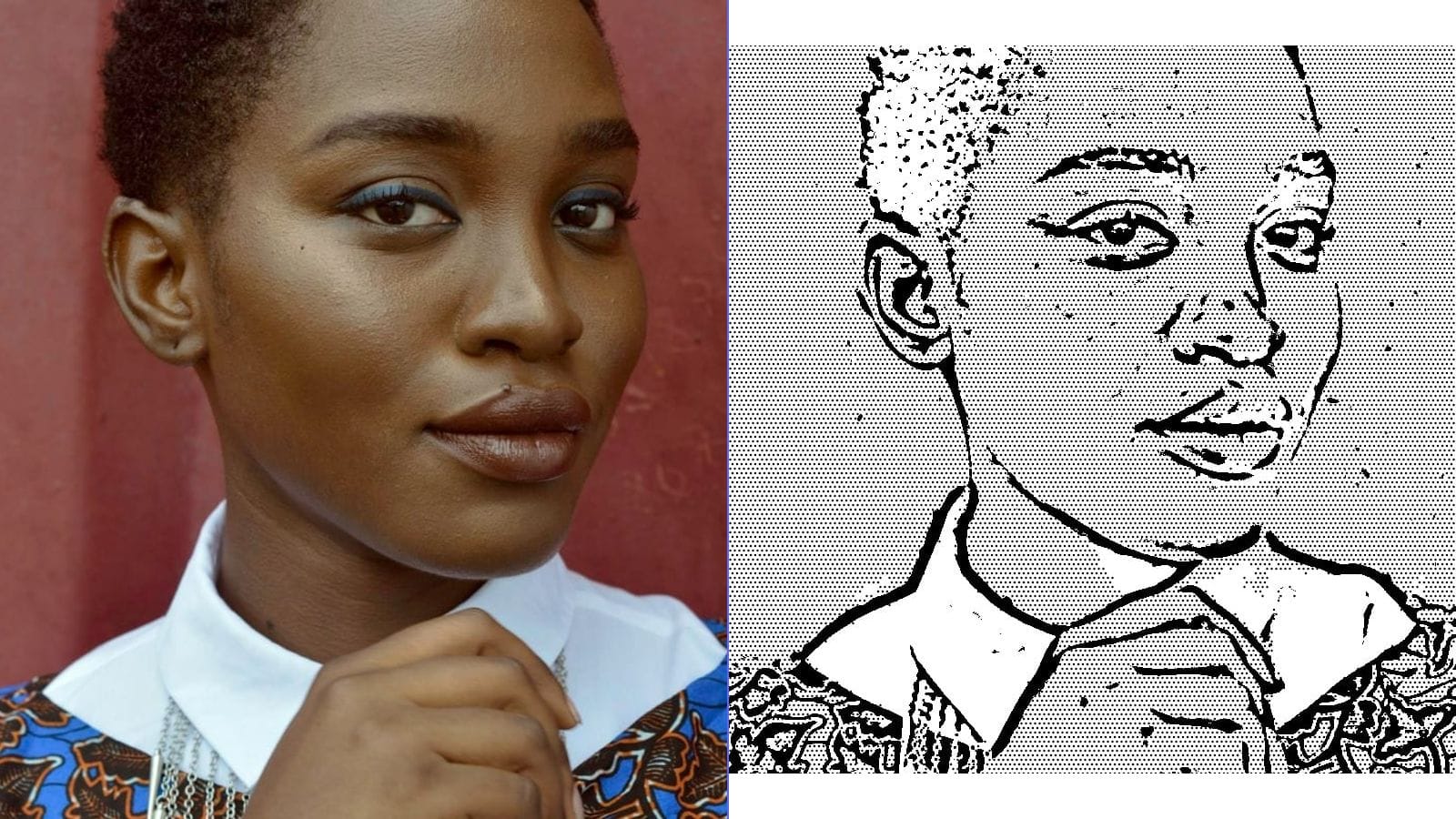
How to Create Manga Screentone Effects from Photos — Complete Guide
If you have ever admired the distinctive shading in Japanese manga and wondered how those dot patterns and gradient textures are created, you are looking at screentones -- one of the most recognizable visual elements in comic art. Screentones give manga its signature look: clean lines filled with mechanical dot patterns that suggest shadow, texture, and mood without using continuous gray tones.
This guide explains what screentones are, how they work, and how you can convert ordinary photographs into manga-style artwork that captures this iconic aesthetic.
What Are Manga Screentones?
Screentones (also called screen tones, tone sheets, or simply tones) are pre-printed adhesive sheets covered with patterns -- most commonly halftone dots, but also hatching, gradients, textures, and decorative motifs. Manga artists apply them to inked artwork to add shading, depth, and atmosphere without hand-drawing every shadow.
The most common screentone is the dot pattern, where evenly spaced circles of varying sizes simulate different shades of gray. A 10% tone has small, widely spaced dots that read as light gray. A 60% tone has large, closely packed dots that appear nearly black. Between these extremes lies a full spectrum of perceived values.
Why Screentones Matter
Manga has historically been printed in black and white on inexpensive paper. Unlike Western comics, which often feature full color, manga needed a way to convey lighting, texture, and emotion using only ink. Screentones solved this problem elegantly:
- Consistent shading without the variability of hand-drawn crosshatching
- Reproducible at any print resolution because dot patterns scale predictably
- Fast application compared to rendering gradients by hand
- Distinctive aesthetic that became inseparable from the manga art form itself
A Brief History: From Physical Sheets to Digital Tools
The Traditional Method
In the pre-digital era, manga artists purchased physical screentone sheets from companies like Letraset and IC Screen. The workflow was painstaking:
- Select a tone sheet with the desired pattern and density
- Place the adhesive sheet over the inked artwork
- Cut around the area to be toned using a craft knife
- Burnish the tone into place with a stylus or bone folder
- Trim away excess material
Professional manga studios maintained enormous libraries of tone sheets, each with a specific dot frequency (measured in lines per inch, or LPI), density percentage, and pattern type. A single page might use five or six different tones to create depth in hair, clothing, backgrounds, and atmospheric effects.
The Digital Revolution
By the early 2000s, software like Clip Studio Paint (originally Manga Studio) and Adobe Photoshop had made digital screentone application standard. Artists could now apply, resize, rotate, and erase tones with a few clicks. The economics changed too -- no more buying expensive sheets or worrying about discontinued patterns.
Digital screentones work on the same principle as their physical counterparts. The software generates a halftone dot grid at a specified frequency and angle, then masks it to the selected area. The result is visually identical to traditional tones when printed.
How Photo-to-Manga Conversion Works
Converting a photograph into a manga-style image with screentone effects involves several image-processing steps. Understanding these helps you get better results, regardless of which tool you use.
Step 1: Contrast Enhancement
Photographs contain millions of subtle color variations. Manga art operates in a much narrower range -- typically pure black, pure white, and a few discrete gray values represented by dot patterns. The first step is to increase the contrast of the source image, pushing shadows darker and highlights brighter to create clear tonal separation.
Step 2: Desaturation and Thresholding
The image is converted to grayscale, then divided into tonal zones. Each zone will receive a different screentone density. Some algorithms use a simple threshold (everything above a certain brightness becomes white, everything below becomes black), while more sophisticated approaches preserve three to five tonal levels.
Step 3: Halftone Pattern Generation
This is the heart of the screentone effect. Each tonal zone is filled with a halftone dot pattern at the appropriate density. Key parameters include:
- Dot frequency (LPI): How many dots per inch. Traditional manga uses 60--70 LPI for standard printing. Lower values create a bolder, more visible dot pattern; higher values produce smoother gradients.
- Dot shape: Circles are most common, but ellipses, diamonds, and squares are also used.
- Screen angle: The angle of the dot grid relative to the page. A 45-degree angle is standard because it is least noticeable to the human eye. When multiple tones overlap, each should use a different angle to avoid moiré patterns -- distracting interference fringes.
Step 4: Edge Extraction
To complete the manga look, clean line art is extracted from the photograph using edge-detection algorithms (typically Canny or Laplacian methods). These outlines are composited on top of the screentone layer, mimicking the inked lines that a manga artist would draw by hand.
Step 5: Compositing
The final image combines the black outlines, screentone-filled shadow areas, and white highlights into a single output that reads as a manga panel.
Step-by-Step: Creating Manga Screentone Art from a Photo
Here is a practical workflow you can follow using browser-based tools like MakeLineArt or similar image-processing applications.
1. Choose Your Source Photo
Not every photograph converts well. Look for:
- Strong directional lighting that creates clear shadows and highlights
- A single, well-defined subject against a relatively uncluttered background
- Moderate contrast -- extremely flat or extremely contrasty images both cause problems
- Resolution of at least 1500 pixels on the longest edge for clean dot patterns
Portrait photos, architectural shots, and still-life images with dramatic lighting tend to produce the most striking results.
2. Generate the Line Art Layer
Use a line-art or edge-detection tool to extract the outlines from your photo. Adjust the threshold until you have clean, readable lines without excessive noise. The lines should define the major shapes -- facial features, clothing folds, architectural edges -- without cluttering the image with minor texture details.
3. Create the Tone Layer
Apply a halftone or dithering effect to a desaturated copy of your photo. If your tool offers dot-frequency controls, start around 60 LPI for a classic manga feel. If you want a more stylized, pop-art look, try 20--30 LPI for larger, more visible dots.
4. Composite the Layers
Overlay the line art on top of the screentone layer. The lines should be pure black and should sit above the dot pattern. If your tool handles this automatically, review the result and adjust the blend if needed.
5. Clean Up
Erase any unwanted artifacts -- stray dots in highlight areas, broken lines, or noisy patches in the background. A clean manga-style image has confident blacks, clear whites, and evenly distributed tones in the midrange areas.
Tips for Choosing the Right Photos
The quality of your manga conversion depends heavily on the source material. Here are specific recommendations:
Best subjects:
- Portraits with Rembrandt or split lighting (strong shadow on one side of the face)
- Buildings and cityscapes with geometric forms and strong shadows
- Animals with defined fur patterns and clear silhouettes
- Objects with reflective surfaces or dramatic backlighting
Subjects to avoid:
- Group photos where individual features are too small to resolve
- Images shot in flat, overcast light with minimal shadow
- Busy backgrounds with lots of fine detail (foliage, crowds, cluttered rooms)
- Low-resolution or heavily compressed images -- JPEG artifacts become amplified by the halftone process
Quick pre-processing tips:
- Crop tightly around your subject before converting
- Boost contrast by 15--25% in any photo editor before running the conversion
- Convert to black and white first so you can evaluate the tonal range without color distracting you
Creative Uses for Manga-Style Photo Conversions
Once you have a manga-screentone version of a photograph, the possibilities extend far beyond simply admiring it on screen.
Social Media and Messaging Avatars
A manga-style portrait makes a distinctive profile picture that stands out from the sea of filtered selfies. The high-contrast, graphic nature of screentone art reads well even at tiny avatar sizes.
Fan Art and Doujinshi
If you create fan comics or self-published doujinshi, photo-converted backgrounds can save hours of drawing time. Convert a photograph of a street scene, café interior, or skyline, then draw your characters on top. Many professional manga artists use this technique for background panels.
Personalized Gifts
Print a manga-style portrait on a mug, phone case, tote bag, or poster for an anime-loving friend. The bold black-and-white aesthetic prints well on merchandise because it does not depend on precise color reproduction.
Comic and Zine Projects
Independent comic creators can use photo-to-manga conversion to establish settings quickly. A converted photograph of your actual neighborhood becomes the backdrop for a story set in that location, grounding fiction in recognizable reality.
Educational Materials
Teachers creating materials about Japanese culture, media literacy, or visual arts can use screentone conversions as practical demonstrations of how manga art is constructed.
Comparison with Other Methods
Manual Application in Clip Studio Paint
Clip Studio Paint (CSP) is the industry-standard tool for manga creation. It includes a massive built-in library of screentones that can be applied, rotated, scaled, and erased with precision. For original manga artwork, CSP is unmatched -- but it requires artistic skill, costs money (subscription or one-time purchase), and has a significant learning curve.
Best for: Working manga artists creating original sequential art from scratch.
Photoshop Halftone Filter
Adobe Photoshop offers a Color Halftone filter (Filter > Pixelate > Color Halftone) that creates dot patterns from photographs. The results are functional but often look more like pop art than manga. Achieving an authentic manga aesthetic in Photoshop requires layering multiple effects: desaturation, levels adjustment, halftone, edge detection, and manual compositing. It is time-consuming and requires intermediate Photoshop skills.
Best for: Users who already own Photoshop and want granular control over every parameter.
Free Browser-Based Tools
Tools like MakeLineArt and similar web applications handle the entire conversion pipeline automatically. You upload a photo, adjust a few sliders, and download the result. Processing happens locally in the browser, so your images are never uploaded to a server.
Best for: Quick conversions, users without specialized software, privacy-conscious workflows.
AI-Based Manga Filters
Various AI-powered apps (often mobile) use neural networks trained on manga artwork to stylize photographs. Results can be impressive but tend to be inconsistent -- faces may be distorted, details invented, or the style may not match traditional screentone aesthetics. Many also require uploading your images to cloud servers, which raises privacy concerns.
Best for: Casual social media use where accuracy and privacy are not priorities.
Best Practices for Printing and Sharing
Resolution and DPI
Screentone effects are resolution-sensitive. If you plan to print your manga-style image, export at 300 DPI or higher. At lower resolutions, individual dots become blurry and the halftone illusion falls apart. For screen-only use (social media, web), 150 DPI or even 72 DPI is acceptable because monitors display the dots sharply at any zoom level.
File Format
Export as PNG for maximum quality. JPEG compression introduces artifacts that interact badly with the regular dot patterns of screentones, creating muddy areas and moiré. If file size is a concern, use PNG with a reduced color palette (indexed color) -- since manga art is essentially black and white, an indexed PNG can be very small.
Print Size
For clean dot patterns at print, follow this rule: the individual dots should be visible but not dominant at the intended viewing distance. A halftone at 60 LPI looks excellent on an A4 or letter-size print viewed at arm's length. For larger prints (posters, wall art), you can drop to 40--50 LPI. For small prints (business cards, stickers), increase to 80--100 LPI.
Sharing on Social Media
Social media platforms re-compress uploaded images, which can degrade screentone patterns. To minimize quality loss:
- Upload at the platform's recommended resolution (e.g., 1080x1080 for Instagram)
- Use PNG when the platform supports it
- Avoid adding additional filters on top of the manga effect
Frequently Asked Questions
What dot frequency should I use for a realistic manga look?
Traditional manga printed in tankōbon (collected volumes) typically uses screentones in the 60--70 LPI range. This produces dots that are visible on close inspection but blend into smooth gray tones at normal reading distance. Start at 60 LPI and adjust from there.
Can I use screentone effects on color images?
Technically yes -- you can apply halftone patterns to individual color channels for a pop art or Roy Lichtenstein effect. However, authentic manga screentones are monochrome. For a true manga look, convert to grayscale first.
How do I avoid moiré patterns?
Moiré occurs when two regular patterns overlap at conflicting angles. If you are layering multiple screentone densities, ensure each layer uses a different screen angle (typically offset by 15--30 degrees). When scanning printed manga art, scan at a resolution that is not a simple multiple of the original print's LPI to minimize moiré.
What is the difference between halftone dots and dithering?
Halftone uses a regular grid of dots with varying sizes. Dithering (like Floyd-Steinberg) uses randomly distributed dots of uniform size. Halftone produces the classic manga screentone look; dithering creates a grainier, more photographic texture. Both are useful, but halftone is what most people associate with manga.
Do professional manga artists still use physical screentone sheets?
A small number of veteran artists and purists still use physical tones, but the vast majority of the industry has moved to digital application via Clip Studio Paint or similar software. Physical sheets are still manufactured and sold, primarily for hobbyists and traditional-process enthusiasts.
Can I use manga-converted images commercially?
If you own the copyright to the source photograph and the conversion tool's license permits commercial output, yes. Always verify the terms of service of any tool you use, and never convert copyrighted photographs you do not own.