Understanding Image Edge Detection: Canny, Sobel, and Adaptive Threshold Explained
Edge detection is one of the foundational operations in computer vision. It is the process by which software identifies boundaries within an image — the places where brightness changes sharply, where one object ends and another begins. Without edge detection, tasks like object recognition, medical image analysis, autonomous driving, and even converting a photograph into a sketch would be far more difficult or outright impossible.
This article provides a thorough explanation of how edge detection works, with a particular focus on three widely used techniques: the Canny edge detector, the Sobel operator, and adaptive thresholding. Whether you are a student learning computer vision, a developer building image processing tools, or simply curious about how photo-to-sketch converters work under the hood, this guide will give you a solid understanding of each method, its strengths, and when to use it.
What Is Edge Detection in Computer Vision?
An edge in a digital image is a region where the pixel intensity changes significantly over a short distance. Imagine a photograph of a white coffee cup sitting on a dark wooden table. The boundary between the cup and the table is an edge — the pixel values shift rapidly from light to dark.
Edge detection algorithms work by analyzing these intensity transitions mathematically. They scan across the image, compute how quickly brightness values change at each point, and mark locations where the rate of change exceeds a certain threshold. The result is typically a binary or grayscale image where edges appear as bright lines against a dark background.
Why Edges Matter
Edges carry a disproportionate amount of information about the structure of a scene. While a photograph might contain millions of pixels of relatively uniform color (the flat surface of a wall, the sky, the surface of a table), the edges alone can convey shape, contour, and spatial relationships. This is why line drawings and sketches are so immediately recognizable — they preserve the most structurally important information while discarding everything else.
In practical applications, edge detection serves as a preprocessing step for tasks like:
- Object detection and recognition — Identifying the outlines of objects before classifying them
- Image segmentation — Separating an image into meaningful regions
- Feature extraction — Pulling out structural information for matching or tracking
- Medical imaging — Highlighting boundaries of tumors, organs, or fractures in X-rays and MRI scans
- Industrial quality inspection — Detecting defects on manufactured parts by identifying unexpected edges or missing contours
The Sobel Operator: A Gradient-Based Approach
The Sobel operator is one of the simplest and most widely taught edge detection methods. It works by computing the gradient of image intensity at each pixel — essentially measuring how quickly brightness changes in the horizontal and vertical directions.
How the Sobel Operator Works
The Sobel operator uses two small matrices called kernels (also known as convolution masks), each sized 3x3. One kernel detects changes in the horizontal direction (Gx), and the other detects changes in the vertical direction (Gy).
The horizontal kernel emphasizes edges that run vertically (since it detects horizontal changes), and the vertical kernel emphasizes edges that run horizontally. When these two kernels are convolved with the image, they produce two gradient images. The magnitude of the gradient at each pixel is then calculated by combining these two values, typically using the formula:
G = sqrt(Gx² + Gy²)
Pixels with a high gradient magnitude are likely to be edges.
Strengths of the Sobel Operator
- Simplicity — Easy to implement and understand, making it a great teaching tool
- Speed — Because the kernels are small (3x3), computation is fast
- Directional information — The separate horizontal and vertical gradients provide information about edge orientation
- Noise smoothing — The Sobel kernel incorporates a small amount of Gaussian smoothing, which helps reduce sensitivity to noise
Limitations of the Sobel Operator
- Thick edges — The output tends to produce relatively thick edge responses rather than crisp single-pixel lines
- Noise sensitivity — While it includes some smoothing, it can still produce noisy results on images with significant texture or grain
- No built-in thresholding logic — You need to manually decide a threshold for what constitutes an edge, which can be tricky
The Sobel operator is best suited for situations where you need a quick approximation of edges, or when you plan to feed the gradient information into a more sophisticated processing pipeline.
The Canny Edge Detector: The Gold Standard
Developed by John Canny in 1986, the Canny edge detector is widely regarded as one of the best general-purpose edge detection algorithms. It was designed with three explicit goals: good detection (finding real edges), good localization (marking edges at their true position), and minimal response (each edge should be marked only once). The algorithm achieves these goals through a multi-stage pipeline.
Stage 1: Gaussian Blur
Before looking for edges, the Canny algorithm applies a Gaussian blur to the image. This step is critical because raw images contain noise — random pixel-level variations that can create false edges. The Gaussian filter smooths out this noise by averaging each pixel with its neighbors, weighted by a bell-shaped curve.
The size of the Gaussian kernel (often specified by a sigma value) controls how much smoothing is applied. A larger sigma produces more blurring, which eliminates more noise but can also soften genuine edges. Choosing the right sigma is a balancing act between noise reduction and edge preservation.
Stage 2: Gradient Computation
After blurring, the algorithm computes the intensity gradient of the image, similar to the Sobel operator. It calculates both the magnitude and the direction of the gradient at every pixel. The direction information is important because it tells the algorithm which way each edge runs, which is used in the next stage.
Stage 3: Non-Maximum Suppression
This is the stage that gives the Canny detector its characteristically thin, precise edges. Non-maximum suppression works by examining each pixel in the gradient image and checking whether it is a local maximum along the direction of the gradient. In simpler terms, for each potential edge pixel, the algorithm looks at the two neighboring pixels that lie along the gradient direction (perpendicular to the edge). If the current pixel has a higher gradient magnitude than both of its neighbors, it is kept. If not, it is suppressed (set to zero).
The result is that broad, blurry edge responses are thinned down to single-pixel-wide lines that precisely trace the edges in the image.
Stage 4: Hysteresis Thresholding
The final stage uses two thresholds — a high threshold and a low threshold — to classify edge pixels:
- Pixels with gradient magnitude above the high threshold are immediately accepted as strong edges
- Pixels with gradient magnitude below the low threshold are immediately rejected
- Pixels with gradient magnitude between the two thresholds are accepted only if they are connected to a strong edge pixel
This two-threshold approach is what makes the Canny detector so effective at producing clean, connected edge maps. Strong edges anchor the detection, and the lower threshold allows the algorithm to follow weaker continuations of those edges without picking up random noise.
Strengths of the Canny Detector
- Thin, precise edges — Non-maximum suppression produces single-pixel-wide edge lines
- Robust noise handling — The Gaussian pre-processing and hysteresis thresholding work together to reject noise
- Connected edges — Hysteresis helps produce continuous edge contours rather than fragmented segments
- Well-studied — Decades of research and optimization make it reliable and well-documented
Limitations of the Canny Detector
- Parameter sensitivity — The results depend heavily on the choice of sigma, high threshold, and low threshold
- Computational cost — More expensive than simple gradient methods due to the multi-stage pipeline
- Fixed thresholds — The global thresholds may not work well on images with varying lighting or contrast across different regions
Adaptive Thresholding: Handling Uneven Illumination
While the Canny and Sobel methods focus on detecting gradients, adaptive thresholding takes a different approach. It is primarily a binarization technique — converting a grayscale image into a black-and-white image — but it is extremely useful for edge-like results, particularly on documents, text, and images with uneven lighting.
Global Thresholding vs. Adaptive Thresholding
In global thresholding, a single brightness value is chosen as the cutoff. Every pixel brighter than the threshold becomes white, and every pixel darker becomes black. This works well when the image has uniform lighting, but it fails badly when different parts of the image have different brightness levels. A document photographed under a desk lamp, for example, might be well-lit on one side and shadowed on the other. A single threshold cannot handle both regions correctly.
Adaptive thresholding solves this by computing a separate threshold for each pixel based on the brightness of its local neighborhood. Instead of one global cutoff, each pixel is compared to the average (or weighted average) brightness of the pixels surrounding it. If a pixel is significantly darker than its local neighborhood, it is marked as foreground (black); otherwise, it is background (white).
How It Works in Practice
The two most common variants of adaptive thresholding are:
- Mean adaptive thresholding — The threshold for each pixel is the mean brightness of a surrounding block of pixels (e.g., an 11x11 or 15x15 neighborhood), minus a constant C. The constant C allows you to fine-tune sensitivity.
- Gaussian adaptive thresholding — Similar to the mean method, but the neighborhood average is weighted by a Gaussian distribution, giving more importance to nearby pixels and less to distant ones. This tends to produce smoother, more natural results.
Strengths of Adaptive Thresholding
- Handles uneven lighting — The local computation makes it robust against shadows, gradients, and varying illumination
- Excellent for documents and text — Widely used in document scanning and OCR preprocessing
- Simple to implement — Available as a single function call in most image processing libraries
- Produces clean binary output — The result is a crisp black-and-white image with no gray areas
Limitations of Adaptive Thresholding
- Not true edge detection — It binarizes the image rather than specifically detecting gradient transitions
- Block size sensitivity — The choice of neighborhood size significantly affects results; too small and you get noise, too large and you lose detail
- Can produce artifacts — On images with large uniform regions, adaptive thresholding can create unwanted patterns or haloing effects
Comparing the Three Algorithms
Understanding when to use each algorithm is just as important as understanding how they work. Here is a practical comparison:
Speed and Complexity
Sobel is the fastest and simplest of the three. It requires only a single convolution pass (or two passes for both directions). Adaptive thresholding is also fast, requiring one pass to compute local averages and one pass to apply the threshold. Canny is the most computationally expensive due to its four-stage pipeline, but the difference is negligible on modern hardware for typical image sizes.
Edge Quality
Canny produces the highest quality edges — thin, well-localized, and connected. Sobel produces thicker, less precise edges that may require additional post-processing. Adaptive thresholding produces binary contours rather than true edges, which can look excellent on high-contrast images but may struggle with subtle gradients.
Noise Robustness
Canny handles noise best thanks to its Gaussian pre-processing and hysteresis thresholding. Adaptive thresholding handles uneven illumination best but can amplify noise in uniform regions. Sobel has basic noise resistance from its built-in smoothing but is the most vulnerable of the three to noisy input.
Best Use Cases
- Sobel — Quick gradient estimation, directional edge analysis, preprocessing for other algorithms, real-time applications where speed matters most
- Canny — General-purpose edge detection, photo-to-sketch conversion, object boundary detection, any task requiring clean and precise edges
- Adaptive thresholding — Document scanning, text extraction, images with shadows or uneven lighting, creating high-contrast artistic effects from photographs
Real-World Applications
Medical Imaging
In radiology, edge detection helps highlight the boundaries of anatomical structures. A Canny edge detector applied to an X-ray can make fracture lines more visible. In MRI analysis, edge detection assists in segmenting brain regions or identifying tumor boundaries. The precision of the Canny detector is particularly valuable here, where a missed or misplaced edge could affect diagnosis.
Autonomous Driving
Self-driving vehicles use edge detection as part of their lane detection systems. The edges of lane markings on a road are identified and tracked in real time. Sobel-based methods are sometimes preferred here because of their speed, though modern systems typically use more advanced deep learning approaches that build upon these foundational techniques.
Industrial Quality Inspection
Manufacturing facilities use machine vision systems to inspect products on assembly lines. Edge detection identifies the contours of parts, and deviations from expected shapes indicate defects. A missing edge where one should exist, or an extra edge where there should be none, can flag a part for rejection.
Photo-to-Sketch Conversion
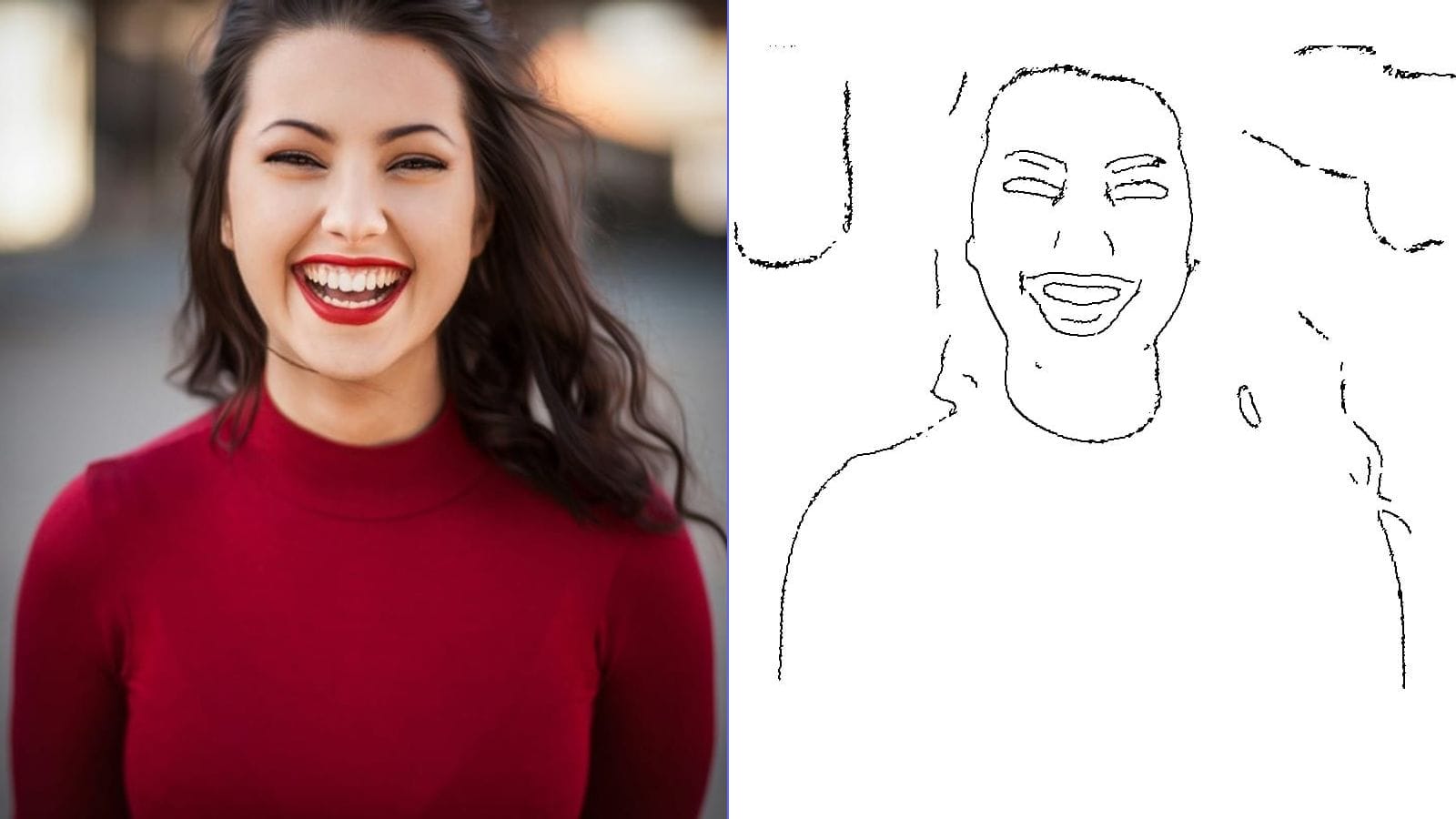
This is where these algorithms come together in a creative application. When you use a tool to convert a photograph into a pencil sketch or line drawing, the software is typically applying one or more of these edge detection techniques. The Canny detector is especially popular for sketch conversion because its thin, connected edges closely resemble hand-drawn lines.
The process usually involves converting the image to grayscale, applying Gaussian blur to reduce noise and create a softer look, running the Canny detector (or adaptive thresholding for a different artistic effect), and then inverting the result so that edges appear as dark lines on a white background. Additional post-processing might include adjusting line thickness, adding paper texture, or simulating pencil shading using the original grayscale values.
Practical Tips for Working with Edge Detection
If you are implementing or experimenting with these algorithms, here are some recommendations drawn from real-world experience:
- Always preprocess your images. Converting to grayscale and applying a mild blur before edge detection almost always improves results, regardless of which algorithm you choose.
- Experiment with parameters. The default settings in libraries like OpenCV are reasonable starting points, but optimal values depend heavily on your specific images. Try different sigma values, threshold levels, and block sizes.
- Combine methods when appropriate. There is no rule that says you must use only one technique. Applying adaptive thresholding to handle uneven lighting and then using Canny for precise edge extraction can yield better results than either method alone.
- Consider your input quality. High-resolution images with good contrast produce far better edge detection results than low-resolution or poorly lit photographs. If possible, improve the source image before processing.
- Look at the histogram. An image's histogram (the distribution of pixel brightness values) can guide your parameter choices. A bimodal histogram (two clear peaks) suggests that global thresholding might work well, while a flat or complex histogram indicates that adaptive methods are needed.
Frequently Asked Questions
What is the difference between edge detection and contour detection?
Edge detection identifies individual pixels where intensity changes sharply. Contour detection goes a step further by grouping connected edge pixels into continuous curves or closed shapes. In OpenCV, for example, you would first run edge detection (such as Canny) and then use the findContours function to extract the contour paths from the edge map.
Can edge detection work on color images?
Most edge detection algorithms operate on single-channel (grayscale) images. For color images, common approaches include converting to grayscale first, running edge detection on each color channel separately and combining the results, or converting to a color space like HSV and detecting edges on the value (brightness) channel.
Why do my edge detection results look noisy?
Noise in edge detection output usually means the input image has too much texture or grain for the current algorithm settings. Try increasing the Gaussian blur sigma, raising the threshold values, or using a larger block size for adaptive thresholding. Also ensure your input image is of reasonable quality.
Which algorithm should I use for converting photos to sketches?
For most photo-to-sketch applications, the Canny edge detector produces the most natural-looking results. Its thin, connected edges resemble pencil strokes. However, adaptive thresholding can produce a bolder, more graphic style that works well for high-contrast subjects. Many sketch conversion tools offer both options and let the user choose the style they prefer.
Is edge detection still relevant with deep learning?
Absolutely. While deep learning has introduced powerful alternatives like the Holistically-Nested Edge Detector (HED) and other neural network-based boundary detectors, classical algorithms like Canny and Sobel remain widely used. They are faster, require no training data, run entirely on the client side, and are perfectly adequate for many applications. Deep learning edge detectors excel when semantic understanding is needed (for example, detecting the boundary of an object even when there is no clear intensity change), but classical methods remain the practical choice for most real-time and client-side applications.
How does kernel size affect Sobel results?
A larger Sobel kernel (such as 5x5 instead of 3x3) incorporates more surrounding pixels in its computation, which provides stronger noise smoothing but also produces thicker, less localized edges. For most applications, the standard 3x3 kernel is sufficient. Use larger kernels only when working with very noisy images or when you specifically want a smoother gradient estimate.
Conclusion
Edge detection is a deceptively simple concept — find where brightness changes — that underpins an enormous range of practical applications. The Sobel operator offers speed and simplicity for gradient estimation. The Canny detector provides the gold standard in edge quality through its elegant multi-stage pipeline. Adaptive thresholding handles the real-world challenge of uneven illumination that trips up global methods.
Understanding these algorithms not only helps you choose the right tool for a given task but also gives you insight into how creative applications like photo-to-sketch conversion actually work. The next time you see a photograph transformed into a clean line drawing, you will know that behind the scenes, one or more of these algorithms is doing the heavy lifting — scanning pixel by pixel, measuring gradients, suppressing noise, and tracing the contours that define the shapes we see.